Choosing the Right Design Software for Your Needs
Key Takeaways
- Assess your skill level and choose software that matches your experience.
- Understand the specific features you need for your projects.
- Consider the software's compatibility with your operating system.
- Look at community support and available tutorials for easier learning.
- Explore different licensing options and costs.
Design software is an essential tool for anyone looking to create stunning visuals, whether you are a beginner exploring your artistic side or a professional designer enhancing your portfolio. With countless options available in the market, selecting the right design software can be overwhelming. This guide will help you navigate your options, ensuring you find software that suits your specific needs and skill level.
Understanding Your Needs
Before you jump into the software selection process, it's vital to evaluate your unique needs. Ask yourself:
- What type of designs do you want to create?
- Are you a beginner, intermediate, or advanced user?
- What are your specific feature requirements?
- What is your budget for design software?
Types of Design Software
Design software can generally be categorized into various types based on their functionalities. Here's a quick overview:
| Type of Software | Description | Best For |
|---|---|---|
| Graphic Design Software | Tools for creating visuals like logos, posters, and brochures. | Professionals and businesses. |
| Digital Painting Software | Applications focused on digital artwork and painting. | Artists and hobbyists. |
| Photo Editing Software | Programs to enhance or manipulate photos. | Photographers and marketers. |
| 3D Modeling Software | Tools for creating three-dimensional designs and animations. | Animators and architects. |
Beginner vs. Professional Software
Choosing software largely depends on your level of expertise. Here's a breakdown of options:
Tips for Beginners
- Look for user-friendly interfaces that offer tutorials and assistance.
- Select software that’s compatible with your hardware to prevent performance issues.
- Explore trial versions to gain hands-on experience before purchasing.
Recommended Design Software
To help you decide, we've compiled a list of recommended design software across different categories. Here are three popular choices:
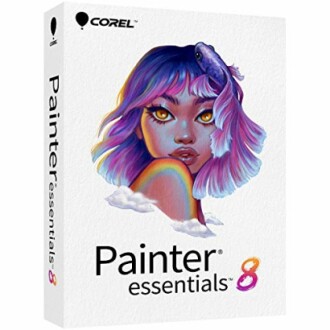 Beginner-Friendly
Corel Painter Essentials 8
Beginner digital painting software with over 170 brushes and AI features for transforming photos into art.
Learn More Professional Choice
CorelDRAW Graphics Suite 2024
A professional graphics suite for vector illustration, layout, and photo editing with extensive tool support.
Learn More Accessible Option
CorelDRAW Essentials 2024
Ideal for occasional users, it includes basic vector illustration and layout tools making it easy to learn.
Learn MoreConsiderations Before Purchase
Once you've narrowed your options, consider the following factors:
- Trial versions: Many software options offer free trials to help gauge your experience.
- Support and community: Look for programs with rich tutorials and active user communities.
- Updates and advancements: Check how often the software is updated and improved.
Conclusion
Selecting the right design software doesn't have to be a daunting task. By understanding your needs and exploring the available options, you can find software that inspires your creativity and enhances your projects. Remember that investing in high-quality design software will make your design journey efficient and enjoyable.
Pros
- Wide range of options available for various needs and skill levels.
- Many programs offer rich tutorials and community support.
- Innovative features can boost creativity and productivity.
Cons
- Some software can be expensive, depending on the features.
- Learning curves can be steep for certain advanced programs.
- Compatibility issues may arise depending on the operating system.
For more detailed comparisons and insights, check our other guides: Design & Illustration, Business & Office, and Music Software.


