Laplink PCmover Ultimate 11 Review - Easy PC Transfer Software
Key Takeaways
- Fast and efficient transfer options using Ethernet or Wi-Fi Direct.
- AI-assisted transfer insights for a personalized experience.
- Complete selectivity for customized transfers of files and applications.
- Seamless compatibility across various Windows versions.
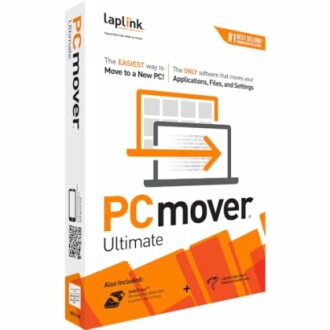
Are you upgrading to a new computer and worried about losing your important files? Look no further than Laplink PCmover Ultimate 11. This innovative software simplifies the data migration process, ensuring a seamless transfer of files, applications, and settings from your old PC to the new one.
With its advanced features and user-friendly interface, Laplink PCmover makes it easy to customize your transfer, providing an efficient solution for anyone looking to transition smoothly to their new device. Discover how this powerful tool can enhance your computing experience and alleviate the stress of upgrading.
About Laplink PCmover Ultimate 11
Laplink PCmover Ultimate 11 is designed to facilitate the transfer of files, applications, and settings from an old PC to a new one with utmost efficiency. Gone are the days of manually moving data or worrying about losing important files during the upgrade process. With this software, users can expect a streamlined experience, allowing for a seamless transition to their new devices.
Key Features of Laplink PCmover Ultimate 11
| Feature | Description |
|---|---|
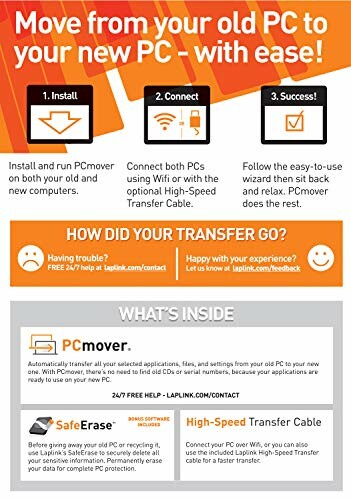
| Fast and Efficient Transfer Options | Utilize Ethernet or Wi-Fi Direct connections for swift data migration. The software includes download instructions for both PCmover and SafeErase, ensuring a secure transfer of data. |
| AI-Assisted Transfer Insights | PCmover's AI Assistant offers a clear summary of items that can be transferred, allowing users to ask questions and make adjustments for an optimized migration experience. |
| Maximum Performance and Reliability | With optimized transfer methods, users can enjoy fast and reliable connections. The advanced technology used in PCmover minimizes wait times, enabling users to start using their new PC immediately. |
| Complete Selectivity for Customized Transfers | Users have full control over the transfer process, allowing them to select specific applications, files, folders, and settings to be migrated. The ability to undo changes offers added versatility. |
| Seamless Compatibility Across Windows Versions | PCmover supports transfers between various Windows versions, including XP, Vista, 7, 8, 8.1, 10, and 11, ensuring that your data arrives safely and accurately regardless of the operating system. |
Performance and User Experience
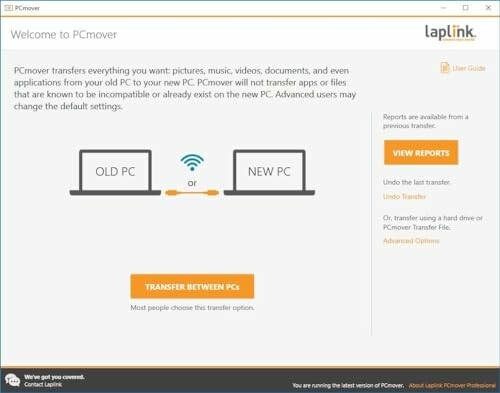
Laplink PCmover Ultimate 11 is not just about transferring files; it provides an intuitive user interface that simplifies the installation and setup process. Users can easily navigate through the software, making it suitable for all demographics, from beginners to professionals. The user manual and customer support are designed to assist users in every step of the migration process.
Ideal Use Cases
- Upgrading to a New Computer: Perfect for users looking to seamlessly transfer all their important files and settings to a new device.
- Data Migration for Small Businesses: Ideal for companies that need to transition multiple computers without the hassle of manual data moves.
- Individuals with Limited Technical Knowledge: The user-friendly interface and AI-assisted features make it accessible for those who are not tech-savvy.
In conclusion, Laplink PCmover Ultimate 11 stands out as a reliable solution for anyone looking to migrate their data. Its fast transfer options, AI-assisted insights, and seamless compatibility make it a must-have tool for anyone upgrading their PC.
Check Current PriceLaplink PCmover Ultimate 11 Benefits
- AI-assisted transfer insights provide a clear summary of transferable items.
- Seamless compatibility across various Windows versions, including XP, Vista, 7, 8, 8.1, 10, and 11.
- User-friendly interface and AI-assisted features make it accessible for those who are not tech-savvy.
Laplink PCmover Ultimate 11 Limitations
- Additional licenses are required for more PCs beyond the initial license.
- The software may require some time to get used to, especially for those without prior experience.
- Some users may encounter difficulties with the transfer process, particularly if their old PC is not properly prepared.
In conclusion, the benefits of Laplink PCmover Ultimate 11 far outweigh its limitations. This software offers a seamless and efficient way to transfer files and applications from an old PC to a new one, making it an essential tool for anyone looking to upgrade their computer. While some users may encounter minor difficulties, the overall experience is designed to be user-friendly and hassle-free, making it a must-have for anyone in need of a reliable data migration solution.
Final Thoughts on Laplink PCmover Ultimate 11
When investing in data migration software, it’s essential to consider several factors to ensure you make the best choice for your needs. Here are some tips for buyers:
- Compatibility: Always check if the software supports the operating systems of both your old and new PCs.
- User Friendliness: Look for software that offers an intuitive interface and good customer support.
- Transfer Options: Ensure the software provides multiple transfer methods, such as Ethernet or Wi-Fi, to suit your setup.
- Cost of Additional Licenses: Be aware of any additional costs for transferring data to more than one PC.
- Read Reviews: Look for feedback from users to understand the common challenges and benefits.
Laplink PCmover Ultimate 11 presents numerous advantages for users looking to migrate their data seamlessly. With fast and efficient transfer options, AI-assisted insights, and broad compatibility with various Windows versions, it simplifies the often daunting task of upgrading computers. On the downside, additional licenses may be necessary for multiple PCs, and users may face a learning curve initially.
Ultimately, Laplink PCmover Ultimate 11 comes highly recommended for anyone seeking a hassle-free data migration solution. Its robust features and user-friendly design make it an excellent choice for both individuals and small businesses. If you want to ensure your upgrade goes smoothly and all your important files and applications are transferred effortlessly, this software is a worthwhile investment.
 Check Current Price