Best Audio Converter Software for Windows 10, 8, and 7 Review
Key Takeaways
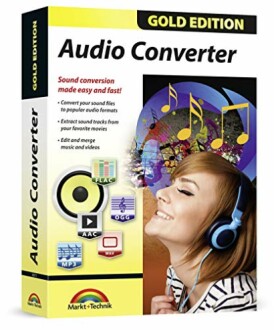
- Audio Converter allows you to convert audio files to various formats, including MP3, MP2, AAC, AC3, WAV, and more.
- It features advanced editing tools, such as trimming, merging, and adjusting sample and bit rate.
- Compatible with Windows 10, 8, and 7.
Are you tired of dealing with incompatible audio files and the hassle of converting them? Look no further! Audio Converter is here to simplify your life and provide you with a seamless audio editing experience. With its user-friendly interface and advanced features, this software is perfect for anyone who wants to edit, convert, and manage their audio files with ease.
About Audio Converter
Audio Converter is a powerful and user-friendly audio editing software that allows you to convert, edit, and manage your audio files with ease. With its intuitive interface and advanced features, this software is perfect for anyone who wants to take control of their audio files.
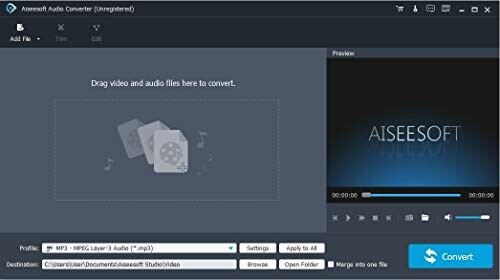
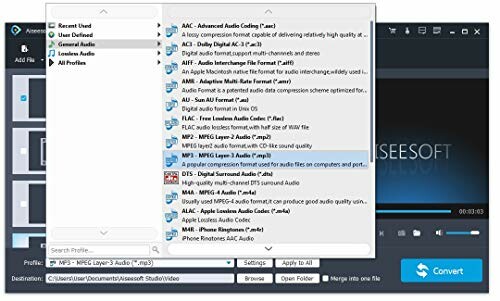
As you can see from the screenshot above, the software interface is clean and easy to navigate. You can easily access all the features and tools you need to edit and convert your audio files.
| Feature | Description |
|---|---|
| AUDIO ALL-ROUNDER | Convert your audio or video files into almost any audio format, including MP3, MP2, AAC, AC3, WAV, and more. |
| Supported Input Formats | MP3, MP2, AAC, AC3, WAV, WMA, M4A, RM, RAM, OGG, AU, AIF, AIFF, PG, MPEG, MPEG 2, MP4, M4V, MJPG, MJPEG, HD TS, HD MTS, HD M2TS, HD MPG, HD MPEG, HD MP4, HD WMV, QuickTime HD MOV and others. |
| Supported Output Formats | AAC, AC3, AIFF, AMR, AU, FLAC, M4A, MKA, MP2, MP3, OGG, WAV, WMA |
Audio Converter also features advanced editing tools, such as trimming, merging, and adjusting sample and bit rate. You can easily extract audio from videos, and even adjust the audio volume to your liking.
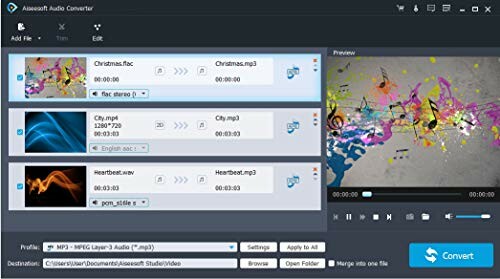
As you can see from the screenshot above, the software interface is clean and easy to navigate. You can easily access all the features and tools you need to edit and convert your audio files.
- Easy to install and use
- User-friendly interface
- Advanced editing tools
- Compatible with Windows 10, 8, and 7
Why You'll Love Audio Converter
- Highly versatile - convert audio files to various formats, including MP3, MP2, AAC, AC3, WAV, and more.
- Advanced editing tools - trim, merge, adjust sample and bit rate, and extract audio from videos.
- User-friendly interface - easy to install and use, making it perfect for both beginners and experienced users.
- Compatibility - works seamlessly with Windows 10, 8, and 7, ensuring that you can use it on any device you need.
- Excellent value - provides a wide range of features at an affordable price, making it a great investment for anyone who wants to take control of their audio files.
A Few Minor Drawbacks to Consider
- No support for Mac or iOS devices - while it's compatible with Windows, it's not compatible with other operating systems.
- No advanced features for music production - while it's great for editing and converting audio files, it's not a professional music production tool.
- No customer support for non-Windows users - if you're not using Windows, you may not be able to get help if you encounter any issues.
Overall, Audio Converter is an excellent choice for anyone who wants to take control of their audio files. While it may have a few minor drawbacks, its versatility, advanced editing tools, and user-friendly interface make it a great investment for anyone who wants to edit, convert, and manage their audio files with ease.
Final Thoughts: Make the Right Audio Choice
When considering an audio converter, it's crucial to look for a product that offers versatility, ease of use, and comprehensive features. Avoid common pitfalls such as opting for overly complicated software or those that lack essential support for your operating system. Always ensure that the audio formats you need are supported by the software.
In summary, Audio Converter stands out for its ability to convert a wide array of audio and video formats, along with its powerful editing tools. While it does have limitations, such as lack of support for Mac systems and no advanced music production features, its user-friendly interface and compatibility with Windows make it a reliable choice for most users.
For anyone looking to enhance their audio experience, Audio Converter is a fantastic option. Its affordability and rich feature set make it ideal for both casual users and those who require more functionality in their audio editing tasks. If you’re ready to take control of your sound, this software is well worth considering.
 Check Current Price