Audio Recorder and Editor Review: Professional Sound Studio for Windows
Key Takeaways
- This software allows you to record, edit, and play back your audio files with ease
- It features a user-friendly interface that's easy to navigate
- Advanced features include blend, fade, and trim options
Are you tired of using multiple software programs to record, edit, and play back your audio files? Look no further! The Audio Recorder and Editor is a powerful tool that allows you to do it all in one place. With its user-friendly interface and advanced features, this software is perfect for music enthusiasts, podcasters, and anyone who wants to take their audio editing skills to the next level.
About Audio Recorder and Editor
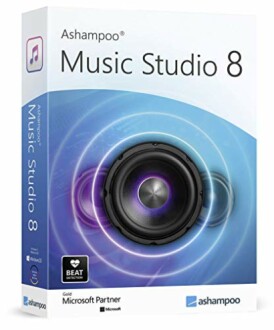
The Audio Recorder and Editor is a professional sound studio software that allows you to record, edit, and play back all common audio files, including WAV, AIFF, FLAC, MP2, MP3, and OGG. With its powerful recording tool, you can record with a microphone or what you can hear, and mix on up to three tracks.
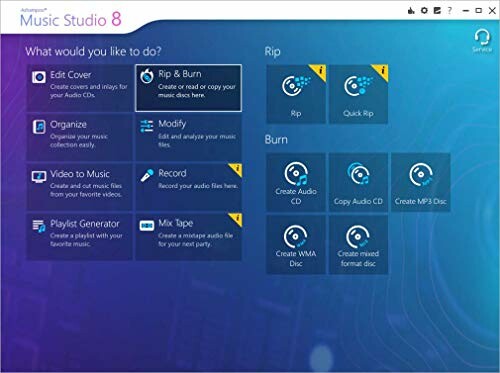
The software features a user-friendly interface that makes it easy to navigate and use, even for those who are new to audio editing. The interface is divided into several sections, each with its own set of tools and options.
| Feature | Description |
|---|---|
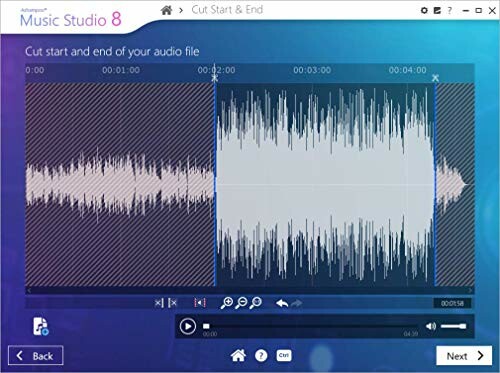
| Easier Sound and Music Editing | The software allows you to blend individual parts, remove or insert passages, apply fade effects, cut and trim sections, and modify track speeds. |
| Powerful Recording Tool | You can record with a microphone or what you can hear, and mix on up to three tracks. |
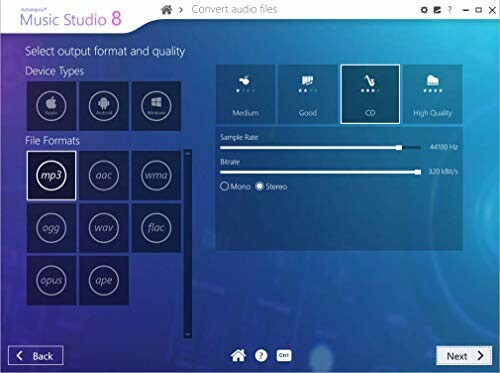
| Any Format You Need | The software allows you to convert your audio files into other formats to make sure they are compatible with all of your devices. |
| Complete Your Project | You can burn your music to CD and create your own CD covers and inlays, without needing to buy another burning program. |
The software is also easy to install and use, with a free tech support whenever you need assistance. Whether you're a music enthusiast, podcaster, or professional audio engineer, the Audio Recorder and Editor is the perfect tool for you.
The software is compatible with Windows 11, 10, 8.1, and 7, making it accessible to a wide range of users.
- This software is perfect for music enthusiasts, podcasters, and professionals who want to take their audio editing skills to the next level.
- The software is easy to install and use, with a free tech support whenever you need assistance.
- The software is compatible with all common audio file formats.
Pros and Cons of the Audio Recorder and Editor
Pros
- Easy to use and navigate, even for those new to audio editing
- Packed with advanced features like blend, fade, and trim options
- Allows for powerful recording and mixing on up to three tracks
- Can convert audio files into other formats for easy compatibility
- Includes a free tech support whenever you need assistance
Cons
- Steep learning curve for those unfamiliar with audio editing software
- Some users may find the interface cluttered or overwhelming
- Limited compatibility with certain audio file formats
In conclusion, the Audio Recorder and Editor is a powerful tool that offers a lot of value to music enthusiasts, podcasters, and professionals. While it may have some drawbacks, the pros far outweigh the cons. With its ease of use, advanced features, and free tech support, this software is well worth considering for anyone looking to take their audio editing skills to the next level.
Take Your Audio Editing to the Next Level
In this review, we've covered the key features and benefits of the Audio Recorder and Editor, as well as its pros and cons. If you're in the market for a powerful audio editing software, this product is definitely worth considering.
Tips for Buyers:
- When buying similar products, make sure to look for features like powerful recording tools, advanced editing options, and compatibility with multiple file formats.
- Avoid products with complicated interfaces or steep learning curves.
In conclusion, the Audio Recorder and Editor is a powerful tool that offers a lot of value to music enthusiasts, podcasters, and professionals. With its ease of use, advanced features, and free tech support, this software is well worth considering for anyone looking to take their audio editing skills to the next level.
So why wait? Get started with the Audio Recorder and Editor today and discover the power of professional-grade audio editing for yourself.
- Summary: The Audio Recorder and Editor is a powerful tool that offers a lot of value to music enthusiasts, podcasters, and professionals.
- Pros: Easy to use, advanced features, powerful recording tool, compatible with multiple file formats, free tech support.
- Cons: Steep learning curve, some users may find the interface cluttered or overwhelming, limited compatibility with certain file formats.
Final Recommendation: If you're serious about taking your audio editing skills to the next level, the Audio Recorder and Editor is a great choice. With its ease of use, advanced features, and free tech support, this software is well worth considering.
Check Current Price