MindManager Professional Review: Ultimate Mind Mapping Software for PC & Mac
Key Takeaways
- Unlock the power of visual thinking with MindManager Professional
- Transform unstructured ideas into dynamic visual mind maps
- Collaborate with ease using real-time co-editing and Microsoft Teams compatibility
In today's fast-paced digital age, effective visual communication is key to staying ahead of the curve. With the rise of remote work and global teams, the need for powerful collaboration tools has never been more pressing. Enter MindManager Professional, a cutting-edge mind mapping software that empowers individuals and teams to transform unstructured ideas into dynamic visual representations.
About MindManager Professional
MindManager Professional is a comprehensive solution designed to help individuals and teams quickly transform unstructured ideas and information into dynamic visual mind maps, flowcharts, concept maps, matrices, and other diagrams.
With its powerful visualization tools, MindManager Professional enables users to evolve their brainstorming sessions into executable strategies, processes, or plans that detail where time and effort are best allocated.
| Feature | What it Offers |
|---|---|
| Microsoft SharePoint and Lists Integration | Seamless integration with Microsoft SharePoint and Lists for effortless collaboration and data sharing. |
| Enhanced Gantt Capabilities | Advanced Gantt chart interface for efficient project planning and management. |
| Updated Contextual Toolbar | Intuitive contextual toolbar for easy navigation and customization. |
| Topic Author Details | Track author details and revisions for enhanced collaboration and version control. |
MindManager Professional offers a wide range of features that cater to various industries and use cases. Whether you're planning a project, defining a process, organizing information, thinking strategically, or making decisions, MindManager Professional has got you covered.
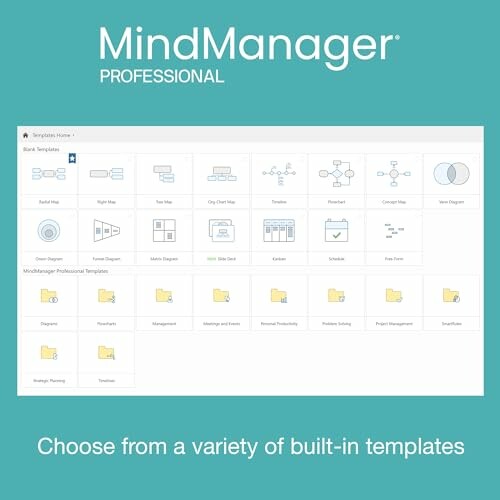
The software comes with a library of built-in templates that can be used as a starting point for your mind maps. These templates are designed to suit various industries, ensuring that you can create diagrams that are tailored to your specific needs.
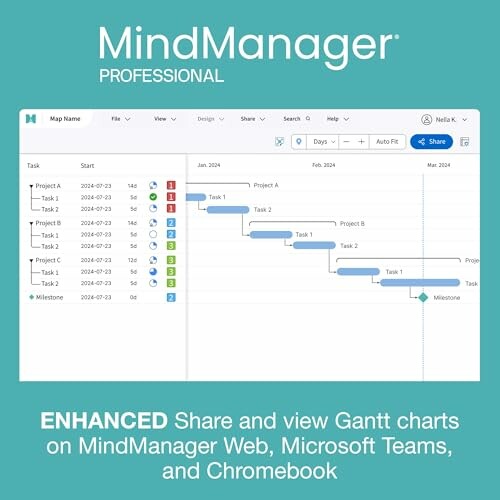
With its Gantt chart interface, MindManager Professional enables users to create dynamic project plans that can be easily shared and collaborated on with team members. This feature is particularly useful for project managers who need to track progress and dependencies in real-time.
Check Current PriceUnlock the Full Potential of MindManager Professional
- Transform unstructured ideas into dynamic visual mind maps, flowcharts, and concept maps
- Seamlessly integrate with Microsoft SharePoint and Lists for effortless collaboration and data sharing
- Enjoy advanced Gantt chart interface for efficient project planning and management
- Access a library of built-in templates tailored to various industries and use cases
Minor Hurdles, Big Benefits
- Steep learning curve for beginners due to the software's advanced features
- Slightly limited customization options for users who prefer a more tailored experience
- Occasional glitches with real-time co-editing feature
Final Thoughts: Elevate Your Mind Mapping Experience
When considering a mind mapping solution like MindManager Professional, there are several factors to keep in mind:
Tips for Buyers
- Evaluate your team's specific needs and workflow to ensure the software aligns with your objectives.
- Look for integration capabilities with tools you already use, such as Microsoft Teams or SharePoint.
- Take advantage of trial versions or demos to familiarize yourself with the software's features before committing.
- Avoid underestimating the learning curve; providing training can help your team maximize the tool's potential.
In summary, MindManager Professional stands out due to its ability to transform unstructured ideas into dynamic visualizations, facilitating better collaboration and project management. The software's integration with Microsoft tools, enhanced Gantt capabilities, and a library of templates are significant benefits that can greatly enhance productivity.
However, the learning curve and occasional glitches in real-time co-editing may pose challenges for some users. Despite these drawbacks, the overall advantages far outweigh the negatives, making it a worthy investment for individuals and teams eager to enhance their brainstorming and planning efforts.
Ultimately, if you are seeking a powerful visualization tool that not only organizes your thoughts but also promotes effective collaboration, MindManager Professional is highly recommended. Its features are designed to foster creativity and productivity, ensuring you and your team can effectively navigate through complex projects and ideas.
Check Current Price