
Essential Features in Effective Checking Software
Key Takeaways
- Checking software streamlines accounting tasks and improves efficiency.
- Customization features enhance the professionalism of issued checks.
- Bank reconciliation and reporting functions are critical for accurate financial management.
- Many software options do not require monthly subscriptions.
In today's fast-paced business world, managing finances efficiently is crucial, and effective checking software plays a significant role in streamlining various accounting tasks. From customizable check templates to features that support bank reconciliation, the right software can enhance your financial workflow. In this article, we will explore the essential features to look for in checking software that can significantly simplify your accounting and finance tasks.
Key Features to Consider
| Feature | Description | Benefits |
|---|---|---|
| Customization Options | Ability to customize checks with logos, signatures, and different fonts. | Enhances professionalism and brand image during transactions. |
| Multiple Accounts | Support for multiple business and personal accounts. | Provides better management for various financial activities in one place. |
| Bank Reconciliation | Tools to reconcile bank statements automatically. | Ensures accuracy and saves time compared to manual reconciliation. |
| No Subscription Fees | One-time purchase without monthly fees. | Cost-effective choice for businesses avoiding recurring expenses. |
| Report Generation | Ability to generate financial reports and transaction history. | Helps in tracking expenses and making informed financial decisions. |
Customizing Your Checks
Customization is a pivotal feature of effective checking software. Users can personalize checks by adding company logos, signatures, and selecting font styles that match their brand image. This not only enhances the professionalism of checks but also provides a unique identity to the transactions. CheckBuilderPro exemplifies software that offers extensive customization options, making it a top choice for businesses.
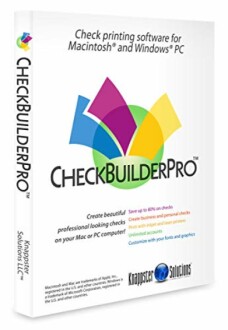 Feature Highlight
CheckBuilderPro - Windows & Mac Check Printing Software
A robust check printing software that supports both Windows and Mac, allowing you to customize checks effortlessly while ensuring accurate and professional transaction documents.
Learn MoreManaging Multiple Accounts
Effective checking software should allow you to manage many accounts, both personal and business. This feature enables users to print checks depending on their needs and desires, leading to increased organization and ease of financial management. Many accountants opt for such software solutions to enhance their efficiency in tracking payments and receipts.
Importance of Bank Reconciliation
Bank reconciliation is essential for ensuring that your transactions match your bank statements. Effective checking software automates this process, allowing for quicker verification and reducing the risk of errors in accounting.
Eliminating Subscription Fees
One appealing feature of many checking software products, like CheckBuilderPro, is that they do not require ongoing subscription fees. This often lowers the total cost of ownership and allows businesses to allocate funds more effectively.
Report Generation Features
Accurate reporting is crucial for tracking finances. Check writing software should provide features that allow users to generate detailed reports based on their checking activities. This feature helps businesses analyze their spending and income quickly to make informed decisions.
Conclusion
In summary, effective checking software can significantly enhance your accounting process. Consider the essential features discussed in this article to make an informed decision when choosing checking software for your needs. The benefits of customization, account management, bank reconciliation, and cost-efficiency cannot be overstated. Explore your options and select software that best aligns with your financial goals.
Tips for Choosing Software
- Assess your specific financial needs and features important for your business.
- Check for positive user reviews and testimonials about the software.
- Look for software that offers a trial or demo period.
- Ensure customer support is available for any technical issues.
- Compare prices and features with alternatives in the market.


