
Enhancing Your Real Estate Management with Quicken
Key Takeaways
- Quicken Classic is effective for managing business, rental, and personal finances all in one platform.
- Utilize built-in tax reports for smoother financial management.
- Streamline your real estate investments for efficient tracking and forecasting.
- Leverage powerful personal finance tools integrated with your real estate finances.
Managing real estate investments can be challenging, but using the right software can make this process much simpler and more efficient. Quicken Classic Business & Personal Finance Software provides tools that help you manage your business, rental, and personal finances seamlessly. In this article, we’ll explore tips to maximize your use of Quicken for effective real estate management.
Why Choose Quicken for Real Estate Management?
Quicken Classic excels in addressing the unique needs of real estate investors. Here are the main reasons:
- Holistic Overview: View your business and personal finances together, allowing for contextual insights.
- Tax Reporting: Access built-in Schedule C and E tax reports to simplify tax season.
- Rental Property Management: Efficiently manage all aspects of your rental properties.
- Comprehensive Finance Tools: Utilize sophisticated personal finance tools to enhance your financial strategy.
Core Features of Quicken Classic
| Feature | Description |
|---|---|
| Business and Personal Finance | Combine your financial data for better decision making. |
| Tax Reporting Tools | Generate essential tax reports with ease. |
| Rental Management | Manage leases, track expenses, and improve tenant relationships. |
| Advanced Budgeting | Set budgets and monitor spending in real-time. |
Getting Started with Quicken
To begin using Quicken Classic effectively, follow these steps:
- Installation: Download the software and follow the prompts to complete installation.
- Set Up Your Accounts: Link your bank and investment accounts to have all your financial information in one place.
- Organize Your Real Estate Investments: Create separate categories for your properties to track income and expenses individually.
- Utilize Reports: Regularly generate financial reports to evaluate your investment performance and make informed decisions.
Best Practices for Managing Real Estate Investments
Here are some best practices to enhance your real estate management using Quicken:
- Regularly update your financial data to ensure accuracy.
- Use the budgeting tool to plan for maintenance and unforeseen expenses.
- Take advantage of Quicken's financial insights to optimize cash flow.
Quicken Product Overview
One of the standout options for real estate management is the Quicken Classic Business & Personal Finance Software. Here’s an overview:
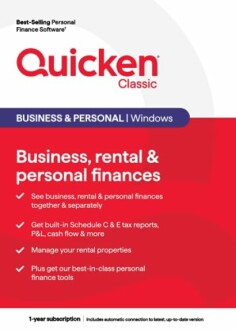 Feature Highlight
Quicken Classic Business & Personal Finance Software
Manage business, rental, and personal finances seamlessly with Quicken Classic. This software includes tax reports, and rental property management tools.
Learn MoreConclusion
Quicken Classic provides invaluable tools for real estate management, from rental tracking to comprehensive tax reporting. By implementing these strategies and making effective use of the software, you can enhance your financial reporting and decision-making. To delve deeper into how to leverage software tools, check out our resources on Education & Reference or enhance your financial strategies with resources on Accounting & Finance.
Further Reading
Expand your knowledge with our articles on:
- Accounting Software
- Business Office Software
- Buying Guides
- Software Tips and Tricks
- Photography Software


