
Tips for Efficient Tax Management Using Bookkeeping Software
- Utilizing bookkeeping software simplifies tax management.
- Key features include electronic form filing and support for tax tables.
- Understanding the software can save time and reduce errors.
- Proper setup is essential for maximizing benefits.
Managing taxes can be a daunting task for individuals and businesses alike. However, with the right bookkeeping software, you can streamline the entire process, making it more efficient and less stressful. This guide will explore how you can leverage bookkeeping tools to improve your tax management and preparation.
What is Bookkeeping Software?
Bookkeeping software is a program designed to help businesses keep track of their financial transactions. It can assist in managing expenses, tracking income, and preparing for tax season. Understanding its features can dramatically improve the way you handle your finances.
Key Features of Bookkeeping Software
Choosing the right bookkeeping software entails recognizing features that could benefit your tax preparation process. Here are some essential features you should consider:
| Feature | Description |
|---|---|
| Electronic Form Filing | File forms like W-2 and 1099-NEC electronically through the software. |
| Tax Tables | Stay up-to-date with the latest tax tables for accurate calculations. |
| Customization Features | Ability to print to blank check stock. |
Why Use Bookkeeping Software for Tax Management?
Using bookkeeping software for managing your taxes comes with several advantages:
- Time-Saving: Automates calculations and reduces manual work.
- Accuracy: Minimizes human errors often found in manual bookkeeping.
- Accessibility: Allows for real-time updates and data access from anywhere.
- Cost-Effective: Can help find potential deductions and reduce tax liabilities.
Setting Up Your Bookkeeping Software
To reap the benefits, it’s crucial to properly set up your bookkeeping software. Here’s how to get started:
- Choose the right software for your needs. You can check out the Bookkeeper: Easily Manage Your Business Finances.
- Input your financial data accurately.
- Configure tax settings based on your local regulations.
- Regularly update data for comprehensive reports.
- Utilize customer support resources if needed.
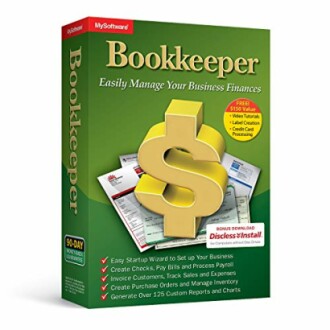 Effective Tax Tool
Bookkeeper: Easily Manage Your Business Finances
This software streamlines financial management and tax preparation, featuring electronic form filing and the latest tax tables.
Learn MoreTips for Maximizing Your Bookkeeping Software Usage
Here are some actionable tips to get the most out of your bookkeeping software:
Beginner's Section
- Start with tutorials to understand the software’s functionalities.
- Make periodic backups of your data to avoid loss.
- Review tax deductions and credits applicable to your business regularly.
- Stay informed about updates to the tax code that may affect your filings.
Common Mistakes to Avoid
When using bookkeeping software for tax management, certain pitfalls can lead to errors:
- Neglecting Regular Updates: Ensure your software is up-to-date with the latest features and tax regulations.
- Ignoring Reconciliation: Regularly reconcile accounts to maintain accuracy.
- Overlooking Preparatory Steps: Complete all necessary preparatory steps for accurate tax filings.
Conclusion
Efficient tax management is within your grasp with the right bookkeeping software. By using features like electronic filing and up-to-date tax tables, you can drastically streamline your tax preparation process. Don’t forget to explore resources for further learning, such as our software tips and tricks.
Pros
- Automated calculations.
- Real-time data access.
- Increased accuracy.
Cons
- Initial setup time required.
- Possibility of software learning curve.


